One system for every device that walks in
RepairAmigo is free electronics repair shop management software built inside a busy phone, console and computer repair shop, where it has processed more than 50,000 repair tickets. One system handles every device type, and it runs on a computer in your own shop.
One system, every device type
The key is problem lists per device type. A phone gets phone problems, a console gets console problems, a computer gets computer problems, and each option carries its own price key and inventory link. The counter picks the device, brand and model, then one of at most four options per step, so intake stays fast no matter what walks in. Returning customers are found by phone number, and the receipt prints with a barcode.
Built-in device types: cell phone, tablet, laptop, desktop and console, plus Other for anything that doesn’t fit those. You add the brands and models you work on under each type.
Pricing that handles very different repairs
Labor, parts and tax come from your price list the moment a problem is picked. Minimum labor and add-ons are applied for you, and screen repairs can be priced in aftermarket and premium tiers. Missing prices are flagged, never guessed. Managers edit the price list in one place.
Parts inventory across device types
Screens are tracked by model, quality and color. Batteries, charging ports, cameras, speakers, HDMI ports and SSDs are built-in part types, and you can stock other part names in inventory too. Saving a repair deducts the parts used. Low and negative stock appear on the ticket, stock below zero blinks red, and, with texting turned on, the Owner and Manager get a text when a count is changed by hand. Every movement links back to its ticket.
Why one system beats three
Plenty of electronics shops run one tool at the counter, a spreadsheet for console jobs and a notebook for computer repairs. That’s three places to look up a customer, three sets of prices and no single view of the day’s cash. With every device type in one system, a returning customer comes up by phone number whether they brought in a phone last month or a console today, and the daily sales summary covers everything.
Console repair
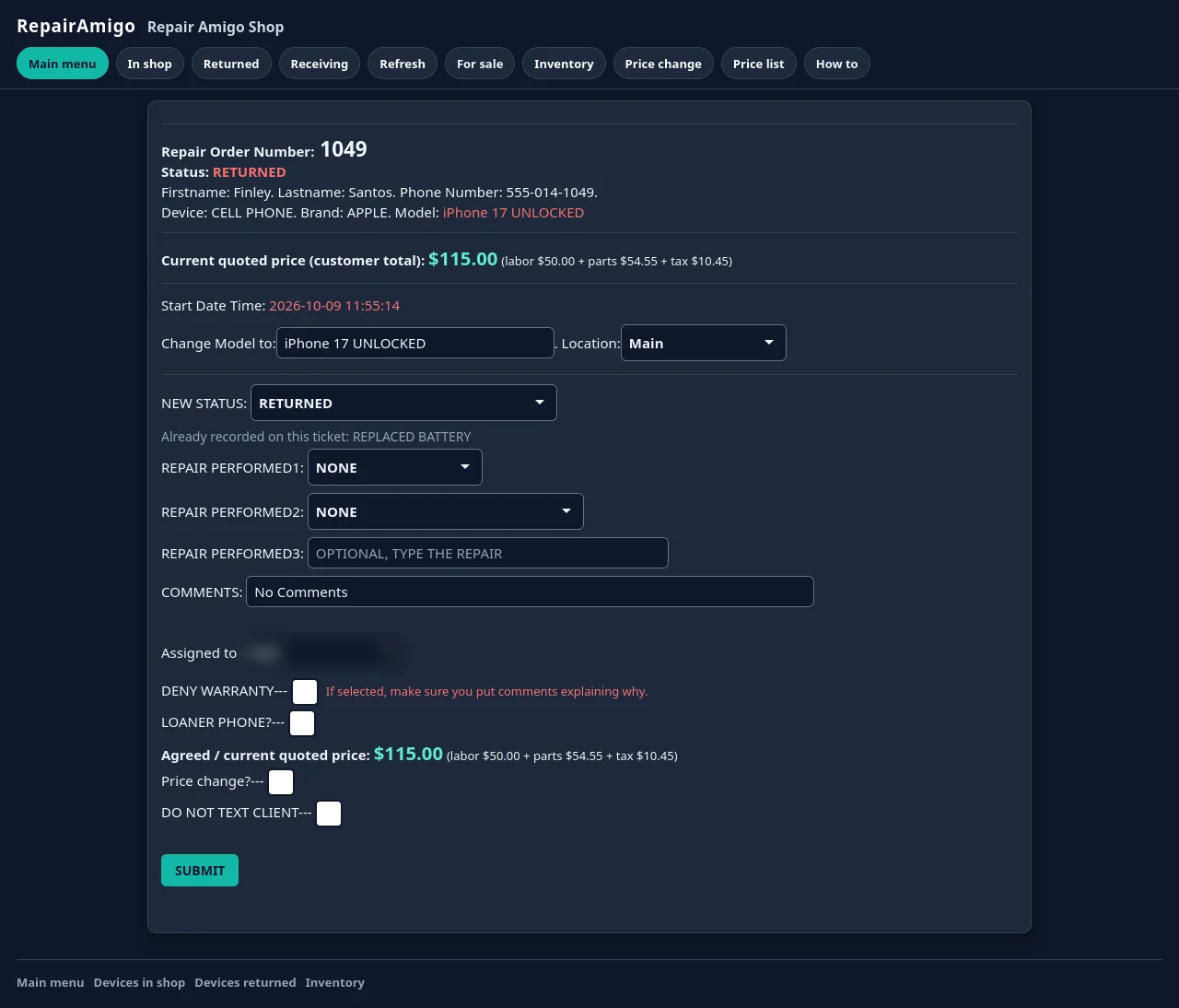
Console repair was part of the shop RepairAmigo was built in, so consoles are handled like any other device type: their own problem list, their own prices, parts deducted when the repair is saved, and, with texting turned on, a text to the customer when it’s ready. HDMI ports are a built-in part type, so a console HDMI port replacement comes out of inventory the same way a phone screen does.
The rest of the shop
- Repair workflow: Repair Performed lists, repair statuses the Owner or Manager can add, remove and reorder, assigned tech and comments, a serial number field on every ticket, commission per tech.
- Customer texts (optional): automatic updates when a device is received, needs input, or is ready for pick-up. Off by default; you connect your shop’s own Twilio account and pay Twilio directly for messages.
- Warranty: returns linked to the original repair, prioritized and costed against the original tech; warranty tickets stand out in red.
- Cash and POS: register and safe balances, a cash sale screen for accessories and walk-ins, a devices-for-sale catalog, referral codes.
- Roles and reports: Owner, Manager and Technician roles with change logs; sales, commissions, refunds and returns.
- Mobile: the same rules and prices in a phone browser, for updating tickets and counting stock from the bench.
Free and self-hosted
RepairAmigo is free, with the same core tools you’d otherwise pay a monthly subscription for (repair tickets, inventory, a point of sale for cash sales, and reports). It runs as a virtual machine in the free VirtualBox software on a Windows, Linux or Intel Mac computer in your shop (at minimum 64-bit Intel or AMD with 16 GB of RAM and 8 CPU threads; the VM itself uses 8 CPUs and 8 GB; Apple Silicon isn’t supported). Staff open it in a browser on the shop network. Your data stays on your computer, the Owner can export it any time, and backups are your responsibility. Read what “free” covers.
Specialize in one device type? See cell phone repair shop software or computer repair shop software.
Common questions
Can one system handle phones, consoles and computers?
Yes. RepairAmigo uses problem lists per device type, each with its own options, price keys and inventory links, so every device gets the right intake and price.
Is RepairAmigo free for electronics repair shops?
Yes. It’s free, and it runs in VirtualBox, which is also free.
Does it track parts for different devices?
Yes. Screens are tracked by model, quality and color. Batteries, charging ports, cameras, speakers, HDMI ports and SSDs are built-in part types, and you can stock other part names too. Screens and built-in parts are deducted automatically when a repair is saved.
Where does my data live?
On a computer in your shop. RepairAmigo is self-hosted, and the Owner can export everything as a SQL backup, CSV tables or an encrypted migration package.
Questions?
Read the setup guide, email support@repairamigo.com, or go back to More about RepairAmigo.